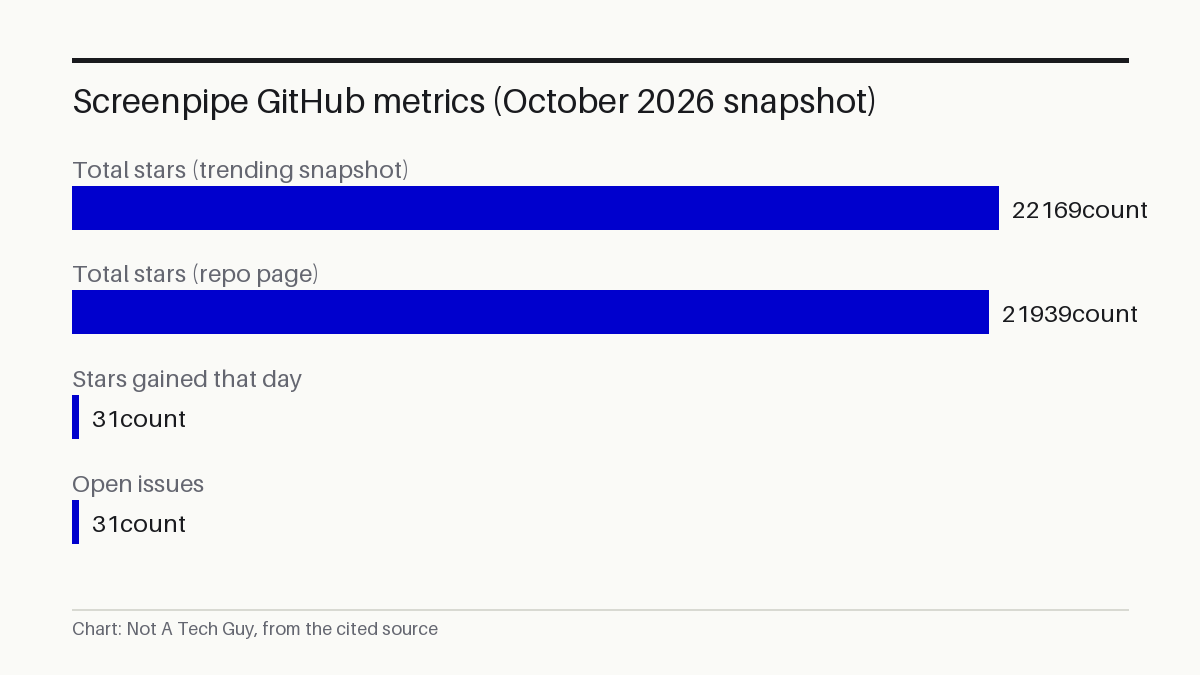

Screenpipe's maintainers landed their project on GitHub's daily trending list on October 30 with 22,169 total stars after gaining 31 that day S¹. The Rust-based tool records every keystroke and screen frame, plus audio, on company computers to feed AI agents, at a moment when those agents are far from trustworthy.
That pitch arrives as agent platforms proliferate, from Medusa's commerce infrastructure for AI agents to OpenAI training agents on contract data. Screenpipe's angle is the input side: before an agent can automate your work, it needs to see what you actually do all day.
The YC S26 badge has no outside confirmation. The only evidence is the maintainers' own README, which brands the project "[ screenpipe | YC S26 ]" P⁵, with no corroboration from Y Combinator or any independent outlet in the evidence pack — YC's own batch pages have not been checked for this project. The resource figures, 5-20% CPU and 0.5-3 GB of RAM, are self-reported with no independent measurement: no error bars, no released benchmark code, and the numbers come from the vendor's own README. The number I'd watch is the 31 open issues against 21,939 stars on the repository's own page P², which suggests an active but thinly resourced project handling real bug reports.
Capture spans the full accessibility tree, audio, and keystrokes
According to the maintainers, the tool works by extracting the operating system's complete accessibility tree, using OCR as a fallback, converting speech to text, distinguishing between speakers, recording what keys are pressed, and monitoring application switches S¹. All of that stays on the local device by default, with optional encryption at rest S¹.
The project labels itself "source-available" rather than open-source, meaning the code can be inspected and modified under a licence the repository files as "Other" S¹P². That distinction matters. "Source-available" does not guarantee the freedoms an OSI-approved licence provides, and the specific terms are not detailed in the evidence.
No third party has assessed the surveillance footprint
A tool that records every keystroke and screen, plus audio, on a company computer creates a surveillance footprint that no third party has assessed. The evidence pack contains no privacy impact assessment or workplace-surveillance compliance review. It also lacks any Australian regulatory context, despite jurisdictions like New South Wales requiring employee consent for computer monitoring under the Workplace Surveillance Act.
The timing is awkward. Feeding a fragile agent pipeline with a comprehensive record of what your employees type and view raises the stakes of any agent compromise.
Small engineering teams are the likely first deployers
The obvious early adopter is a small engineering team that already trusts its members to run local capture tools and wants to identify repetitive workflows for automation. A team lead could deploy Screenpipe on their own machine, record a week of standups, ticket triage, and code review, then ask the tool to flag patterns worth automating.
For an IT operations manager evaluating endpoint monitoring tools, Screenpipe would add a new category to their procurement checklist: not just what software runs on a machine, but a continuous audio and keystroke feed destined for an AI agent pipeline — a data flow that existing endpoint management consoles were not built to govern.
The less obvious risk is deployment beyond that trusted circle. Any rollout to employees without explicit consent and a written policy, plus a legal review of local surveillance laws, would be reckless on the current evidence.
The repository was created in June 2024 P² and lists its homepage at screenpipe.com P².
Sources: S1 — screenpipe/screenpipe: YC (S26) | Open Computer History | Continuously · P2 — screenpipe/screenpipe · P3 — Add measured Galaxy S26 NPU/GPU section · litert-community/RF-DETR-Seg · P4 — computerhistory/AlexNet-Source-Code · P5 — screenpipe/README.md at main · screenpipe/screenpipe · GitHub
Written from 5 sourced items, 4 of them primary.