Google has turned the Gemini app into a document editor, letting users generate, preview and edit PDFs, spreadsheets, slide decks and code files without leaving the chat window S¹. The feature is available to all users in every language where the Gemini app operates, including free users S¹.
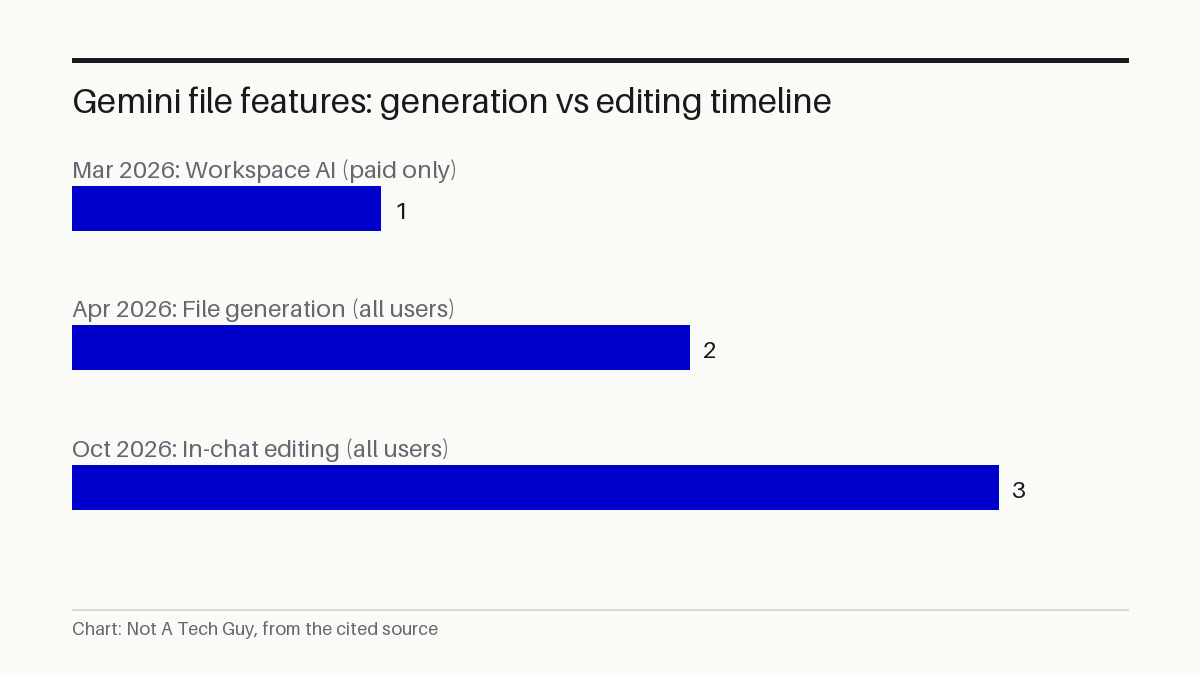
That is a shift from Google's earlier approach. In March 2026, the company brought Gemini AI into Docs, Sheets and Slides, but restricted those features to Google AI Ultra and Pro subscribers, as Yulie Kwon Kim, VP of Product for Google Workspace, announced at the time P⁶. A month later, Maryam Sanglaji, Group Product Manager for the Gemini app, said Gemini could generate downloadable files from a prompt, including Microsoft Word and Excel formats alongside Google's own P³. What was missing was the ability to actually edit those files inside the chat. Now you can S¹.
My read: This is the first time I've seen Google collapse the gap between generating a file and editing it into a single chat surface, and making it free to all users is the part that caught my eye. I don't buy that the editing experience matches a real word processor yet, because Google's own announcement describes it in terms of "refine" and "highlight to ask questions" rather than full cursor-based editing. The web-only restriction on everything except PDF tells me the mobile experience is still half-built. What I'd watch is whether Google extends this to Microsoft Office formats, which the April file-generation update supported but this editing release does not mention.
What you can actually do
The workflow runs inside the chat thread. You ask Gemini to produce a file, it appears inline, and you can expand it to full screen to type edits directly S¹. You can highlight a section of text and ask Gemini a question about it, or have the model refine the content S¹. Google's own example: upload handwritten lecture notes, ask Gemini to build a PDF study guide, then manually edit the result, highlight specific sections for Gemini to adjust text or visuals, and ask follow-up questions S¹.
PDF preview and editing works on both web and mobile S¹. Every other format, including Google Docs, Google Sheets, slide decks, Markdown files, TXT files and code, is web only S¹. Google does not list Microsoft Word, Excel or PowerPoint among the editable formats in this release, even though the April file-generation update could produce those formats P³.
Who feels this first
A university student who photographs lecture notes and wants a formatted study guide can now do the whole job in one chat thread on a phone, since PDF editing works on mobile S¹. A marketing manager drafting a slide deck in Gemini on a desktop browser can generate the deck, highlight a bullet point, and ask Gemini to tighten the wording, all without exporting to Google Slides first S¹. A developer can generate a code file and refine it in the same window, though only on the web S¹.
The capability arrives as Google pushes Gemini on multiple fronts. The company launched Gemini 4 Argon at $2 per million tokens earlier this month, as we found when Google launched Gemini 4 Argon, and announced the Genie 4 world model just two days before this editing update, as we noted in our coverage of Google DeepMind's Genie 4 announcement. The file-editing feature is a product-layer change rather than a model upgrade, but it widens the gap between Gemini as a general-purpose assistant and the narrower tool integrations Google shipped in March P⁶.
No independent testing has been published. Every capability described here comes from Google's own announcement on The Keyword, the company's product blog S¹. The editing precision, formatting fidelity and speed on large files remain unverified outside Google.
Google has not announced a date for extending mobile support beyond PDF or for adding Microsoft Office formats to the editing surface. The features are live now for all Gemini app users in supported markets S¹.
Sources: S1 — You can now generate, preview, and edit documents, PDFs, presentations · S2 — You can now generate, preview, and edit documents, PDFs, presentations · P3 — You can now generate files in Gemini · P4 — timf34/arxiv2md · P5 — CasualOffice/docs · P6 — Google shares Gemini updates to Docs, Sheets, Slides and Drive
Related reading
- Google DeepMind's Gemini 3.8 TTS clones a voice from 30 seconds — our technology desk, 2026-09-23
- Google launches Gemini 4 Argon at $2 per million tokens — our technology desk, 2026-10-13
- Google DeepMind announces Genie 4 world model — our technology desk, 2026-10-27
Written from 6 sourced items, 5 of them primary.