

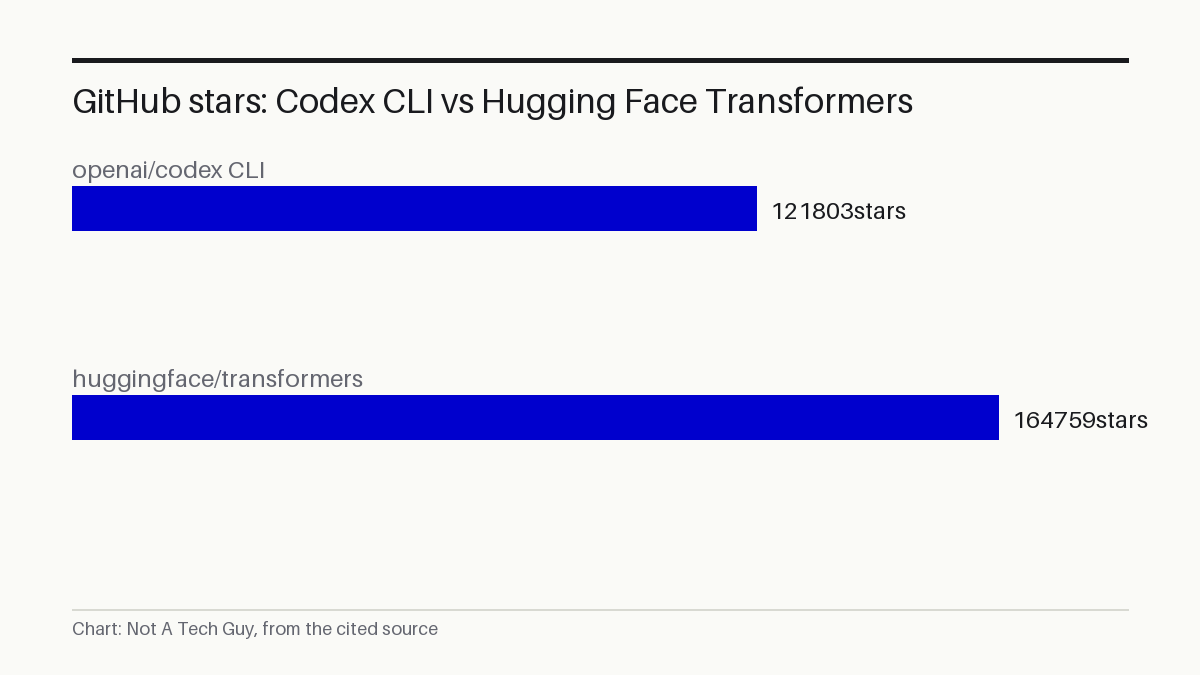
OpenAI's Codex CLI, a terminal-based coding agent with 121,803 GitHub stars, landed on GitHub's daily trending chart on September 6 S¹. The tool runs locally on your own machine, not in OpenAI's cloud, and it's built in Rust under an Apache-2.0 licence. What's less obvious is why a company that staked its Codex brand on cloud-based parallel task execution is now pushing a tool that lives in your terminal.
My read: This is the first time I've seen OpenAI put serious weight behind a locally-run, open-source coding tool under the Codex name. The cloud Codex that launched in May 2025 P² and went generally available in October 2025 P⁴ was a different bet: delegate tasks to OpenAI's servers, let them run in parallel. A Rust CLI that runs on your laptop inverts that model. I don't buy the idea that this replaces the cloud version. The 232 stars it gained today S¹ against an existing base of 121,803 suggests renewed interest, not a fresh launch. What I'd watch is whether OpenAI treats the CLI as a first-class product or lets it drift, the way so many corporate open-source projects do.
A local tool from a cloud company
The README describes Codex CLI as a "lightweight coding agent that runs in your terminal" S¹. The maintainers, which is to say OpenAI's own team, say it runs locally on your computer S¹. That description is self-reported, not independently reviewed S¹.
What's verifiable: the repository exists at github.com/openai/codex, it's written primarily in Rust S¹, and it carries an Apache-2.0 licence S¹. That's the same permissive licence used by Hugging Face's Transformers library, which sits at 164,759 stars P³. Apache-2.0 means anyone can read, modify, and redistribute the code, including for commercial purposes.
Installation options include curl scripts for Mac, Linux, and Windows, plus npm and Homebrew S¹. The curl approach pipes a script directly from the internet into your shell, a practice that's convenient but worth pausing over if you're running it on a production machine.
How you pay for it
Codex CLI works with two authentication paths. The first is signing into your ChatGPT account, which means it's covered by existing Plus, Pro, Business, Edu, or Enterprise plans S¹. No separate billing. The second is an OpenAI API key, which the maintainers note requires additional setup S¹.
This matters because it changes the economics. If you already pay for ChatGPT Plus, the marginal cost of trying Codex CLI is zero. If you use the API path, you pay per token, and the maintainers don't document the cost implications in the README.
Not the same Codex
OpenAI now runs at least four Codex-branded products. The CLI is the terminal version. There's also a code editor extension, a desktop app, and Codex Web, the cloud-based agent S¹. The cloud Codex launched in May 2025 as a parallel task runner powered by codex-1, available to Pro, Business, and Enterprise users P². It reached general availability in October 2025 with new team features including a Slack integration P⁴.
The CLI is a different animal. It runs on your machine, reads your local files, and executes commands in your terminal environment. The cloud version delegates work to OpenAI's infrastructure. Conflating the two would be like confusing a power drill with a construction crew.
The CLI is the other end of the spectrum: bring the agent to your code, not your code to the agent.
What to do about it
If you write code and have a ChatGPT Plus subscription, Codex CLI is worth a weekend install. The practical appeal is simple: instead of copying code into a browser window, you run the agent where your code already lives, in the terminal where your build commands, git history, and test suites sit.
Consider a small web studio that maintains a dozen client sites. A developer could point Codex CLI at a repository, ask it to find and fix a recurring CSS bug across all sites, and review the diff locally before committing. The agent reads the files on disk, proposes changes, and the developer stays in control of what ships.
One thing to check this week: the installation method. If you're cautious about piping curl to shell, use the npm route instead (npm install -g @openai/codex) S¹. Read the repository's issue tracker before relying on it for production work. The repo is new enough that long-term stability claims aren't supported by the evidence.
What we don't know yet
The evidence pack is a GitHub repository page, not a launch announcement. OpenAI has not, as far as the available sources show, issued a formal press release for the CLI. All functional descriptions come from the maintainers' own README S¹.
We don't have independent benchmarks, security audits, or production-readiness assessments. The 121,803 star count S¹ tells us the repo is popular, not that it's reliable. The 232 stars gained on September 6 S¹ confirm trending status as of that date, but star counts and trending positions change fast.
We also don't know how the CLI relates to OpenAI's model roadmap. Whether it uses the same models as the cloud Codex, or a different optimised variant, isn't documented in the available sources.
The next signal: OpenAI's next product update or developer conference, where the company typically clarifies which Codex surfaces get investment. We'll check whether the CLI gets feature parity with the cloud version or remains a lighter companion tool. If you want that follow-up in your inbox, the subscribe button is right there.
Sources: S1 — openai/codex: Lightweight coding agent that runs in your terminal · P2 — Introducing Codex | OpenAI · P3 — huggingface/transformers · P4 — Codex is now generally available | OpenAI · P5 — labrat-0/ai-ml-scraper
More from Not A Tech Guy
- ACToR retrieval lifts AI code generation 15% on CoderEval
- AI agents learn your standards, up to 20.9% better
- LoopX adds durable memory to Claude Code and Codex agents
Generated from an audited evidence pack with primary-source research. Social-media items are discussion signals, not verified facts. Nothing here is financial, legal or medical advice.